AI 3D Modeling can turn a text description, sketch or reference image into a three-dimensional starting point in a short time. For product teams, the important question is not whether a system can create a convincing shape. The important question is whether the result can be reviewed, edited, tested and prepared for a real manufacturing process. A generated mesh is a useful hypothesis. Manufacturing readiness still depends on dimensions, interfaces, materials, tolerances and human approval.
What AI 3D Modeling Actually Produces
AI 3D Modeling from Text, Sketches and Images
Text-to-3D systems infer a form from a written description. Image-to-3D systems infer depth and structure from a reference view. A sketch can communicate proportion and intent, while a set of views or measurements gives the reviewer more useful constraints. A single image rarely communicates hidden features, scale or assembly logic, so the first output should be treated as an interpretation.
For product work, the input should include intended use, important interfaces, approximate dimensions, material expectations and any surfaces that must remain visible. Better inputs do not guarantee a correct model, but clear inputs make review more focused. The process is therefore partly a modeling task and partly a requirements task.
Generated Mesh Geometry Versus Manufacturing CAD
Most generators produce a polygon mesh or another visual representation. Such a representation can be excellent for exploring form, but a manufacturing package usually needs controlled dimensions, clean interfaces, meaningful wall conditions and a structure that can be edited. A mesh may contain gaps, thin areas, self-intersections or proportions that look correct from one view but fail in assembly.
That distinction prevents a common mistake: sending a visual result directly to a printer or machine shop. The model needs an engineering review, and sometimes a rebuild in a CAD environment. Generative modeling accelerates the first geometry, not every downstream engineering task.
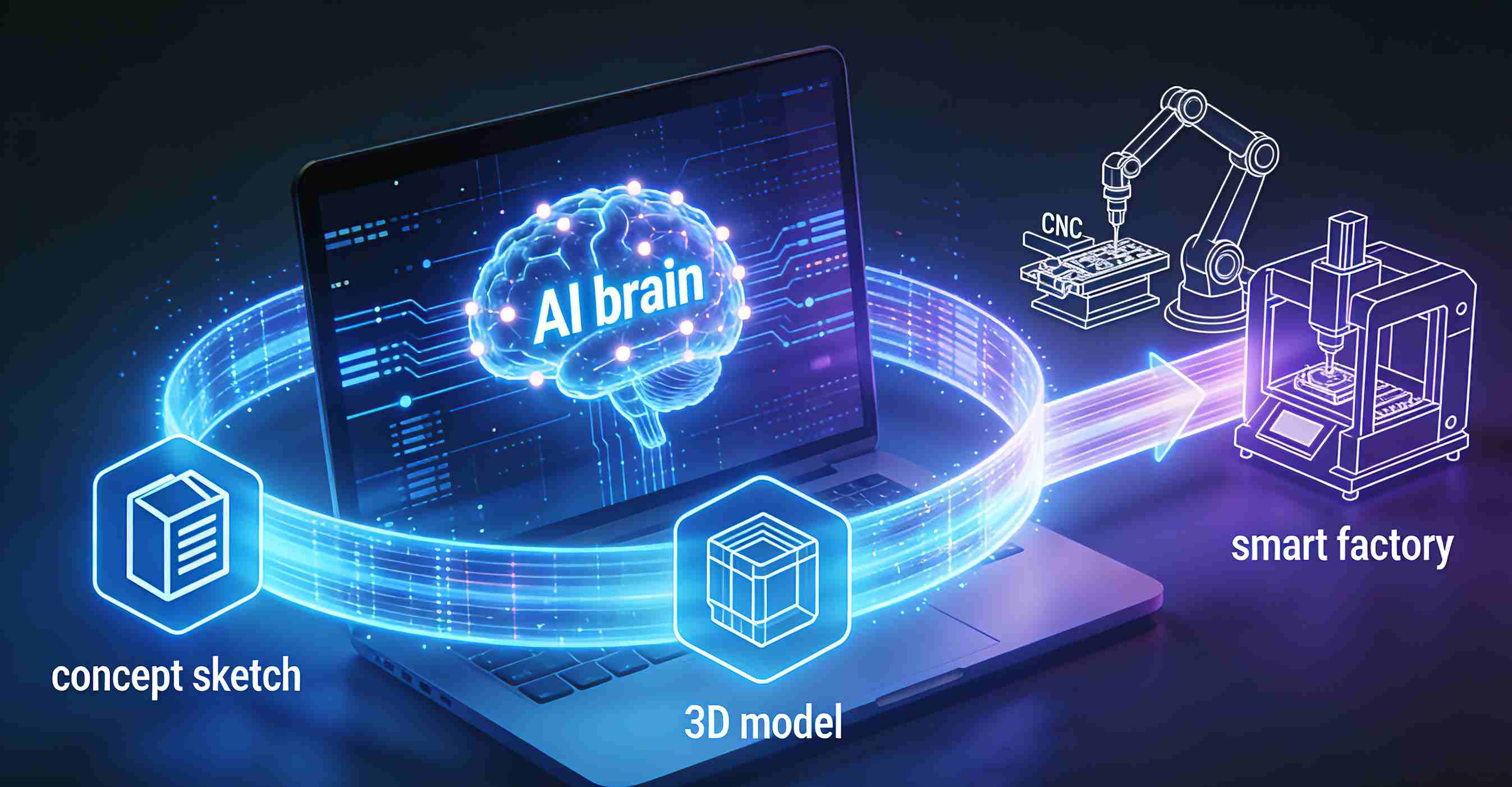
How the AI 3D Modeling Workflow Moves from Prompt to Geometry
Step 1 - Define AI 3D Modeling Intent and Inputs
Start with the product purpose and the decision the model must support. A concept review may need appearance and proportions. A fit check needs interfaces and reference dimensions. A prototype for handling needs realistic touch points and enough structural detail to test the use case.
Reference images, sketches and written constraints should be organized before generation. Teams should mark known dimensions, unknown dimensions and features that cannot change. This prevents a polished preview from hiding missing requirements.
Step 2 - Generate, Inspect and Refine the Modeling Mesh
Generation is an iterative loop. The team reviews the preview from several angles, checks proportions against the reference, and records errors that matter to the product decision. A second prompt or revised input can improve the form, but human judgment decides whether the change solves a real problem.
Structural design review adds another layer. Users can comment on visible details, while engineers examine interfaces, support features and likely loads. Visual feedback makes the conversation concrete, yet no preview should be described as proof of strength, accuracy or production performance.
Step 3 - Export Modeling Files for Downstream Work
After a preview is accepted, the file may move into CAD cleanup, mesh repair, slicing preparation or supplier review. The required format depends on the next tool and the intended output. A file exported for visual presentation is not automatically suitable for a physical prototype.
The handoff should include version information, known dimensions, material assumptions and open questions. A supplier can then determine whether the geometry needs redesign, conversion or a different production route. Generative modeling creates momentum when the handoff preserves context instead of sending an unexplained mesh.
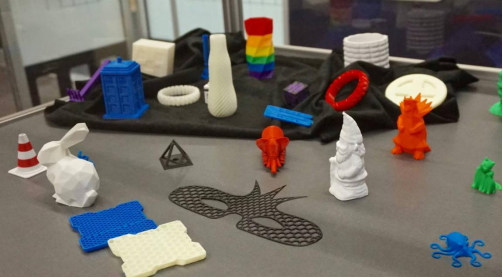
Making an AI 3D Model Manufacturing-Ready
AI 3D Modeling Checks for Topology, Walls, Interfaces and Dimensions
Before printing or machining, reviewers should check whether the model is closed, stable and free from obvious self-intersections. Wall conditions, openings, fastener locations, mating surfaces and critical dimensions should be compared with the product requirement. For CNC work, the team should also consider tool access, material choice and the complexity of the shape.
These checks are process-specific. A geometry that works for additive prototyping may need substantial changes for subtractive machining or injection molding. The review should identify which surfaces are cosmetic, which interfaces are functional and which dimensions require inspection.
Prototype a Generated 3D Output Before Selecting Production
3D printing often provides a fast way to test appearance, fit and handling before a more committed process is selected. CNC machining can validate a customized or complex part in a chosen material. Injection molding is suited to repeatable plastic production after the design and mold decisions have been reviewed.
The prototype is not only a demonstration. The team should document what was tested, what failed, and which design changes followed. This evidence helps a supplier quote the next step and helps a buyer decide whether the model is ready for tooling or a production batch.
How Momaking Helps Move AI 3D Modeling Toward Production
Use Structural Review to Turn an Image into a Buildable Direction
At Momaking, we combine an industrial design AI agent with a structural-design workflow for customers who begin with an image or design concept. Our documented process includes image processing, 3D modeling, structural analysis, visual feedback and user participation. The result is a reviewable structural direction, not an unsupported promise that a single generated mesh is production-ready.
We use customer feedback to refine design details and clarify the next engineering questions. This gives the generated model a practical bridge to manufacturing: the concept becomes easier to discuss, assess and prepare for a physical validation step.
Match a Validated 3D Output to 3D Printing, CNC or Molding
Our services include 3D printing, CNC machining, mold manufacturing and injection molding. We can use 3D printing to support prototype validation, CNC machining for complex or customized parts, and injection molding for repeatable plastic production when volume and design conditions support that route.
We also create or support design files intended for 3D printing, CNC and molds. Buyers should confirm the final dimensions, materials, finishes, quantity and inspection requirements before production. Momaking’s role is to connect a reviewed design direction with a suitable manufacturing path while keeping the transition from model to part understandable.
FAQ
Q: Is every AI 3D model ready to print or machine?
A: No. Topology, wall conditions, interfaces, dimensions, material assumptions and process constraints still need review. A prototype or engineering rebuild may be required.
Q: Which inputs produce the most useful AI 3D Modeling result?
A: Provide a clear design purpose, reference images or sketches, important dimensions, interfaces, material expectations and known constraints. More context improves the review, but does not remove the need for engineering judgment.
Q: Can Momaking help after an AI-generated concept is created?
A: Yes, within the verified scope of structural design and manufacturing services. Momaking can discuss a customer image or concept, develop a reviewable structure, and connect the approved direction with 3D printing, CNC machining, mold manufacturing or injection molding.